The World Health Organization (WHO) has introduced a global safe-listening standard covering video gaming and esports, highlighting the importance of protecting players from prolonged exposure to loud audio, sudden in-game effects and spikes in voice-chat volume.
The guidance comes amid growing concerns about hearing damage caused by recreational listening. The WHO warns that more than one billion people aged 12 to 35 are at risk of hearing loss due to exposure to loud sounds, including through personal audio devices and digital entertainment. Meanwhile, a review published in BMJ Global Health estimated that 23.81% of personal listening device users aged 12 to 34 were exposed to potentially unsafe listening levels.
Olivia Kewney, Audiologist and Tinnitus Specialist at The Hearing Centres, explains that gaming can present particular challenges because players often lose track of how long they have been playing and how loud their headsets are.
“During gaming, players may raise the volume to hear footsteps or dialogue, then face sudden effects, explosions or voice-chat peaks at the same setting. A headset may also stay on for hours before they notice fatigue or symptoms.”
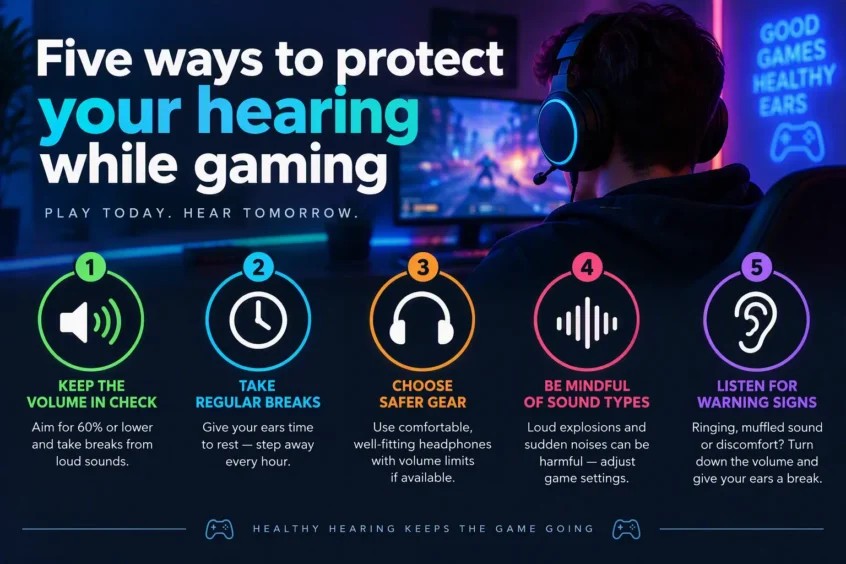
Five Ways to Protect Your Hearing While Gaming
1. Balance Individual Sound Settings Instead of Raising Everything
“If you raise the overall headset volume to hear quieter in-game sounds, louder effects become louder too. Where possible, adjust music, sound effects, dialogue and voice chat independently. This can help improve clarity without relying on the master volume.”
2. Adjust Voice-Chat Levels Before Starting
“Teammates can suddenly sound much louder than the game, particularly when everyone is using different microphone and audio settings. Adjust individual voice-chat levels where possible, and reduce the overall volume if voices are repeatedly startling or uncomfortable.”
3. Take Genuine Quiet Breaks Between Matches
“Pressure, sensitivity, ringing in the ears or sounds becoming harsh are all reasons to pause. Remove your headset between matches or during loading periods, and make sure you spend that time away from loud audio rather than switching to music or videos.”
4. Check Your Headset Fits Correctly
“If a headset is loose, uncomfortable or damaged, speech and sound effects may become harder to hear clearly. Players may respond by turning up the volume. A properly fitting headset can improve clarity and help you avoid unnecessarily high listening levels.”
5. Review Volume Controls for Younger Gamers
“Children may focus on how exciting a game sounds rather than whether the volume is safe. Parents should encourage regular breaks, check the available volume controls and watch for warning signs such as ringing in the ears, muffled hearing or difficulty hearing after a gaming session.”
Warning Signs to Look Out for After Gaming
“If your hearing feels muffled after removing your headset, you experience ringing in your ears, or everyday sounds seem unusually quiet, stop using loud audio and give your ears time to recover.
“If these symptoms persist, repeatedly return after gaming, or are accompanied by a noticeable change in hearing, arrange a hearing assessment rather than simply turning the volume down and continuing to play.”
Credit https://thehearingcentres.co.uk/
Want more news from the Tech world for Gaming Peripherals to Hardware Click Here