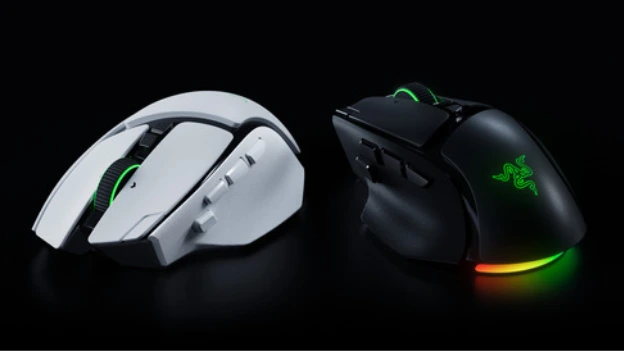
Razer has announced the launch of the Razer Basilisk V4 Pro, the latest version of its popular ergonomic gaming mouse, alongside the new Razer Mouse Dock V2 Pro wireless charging dock.
The Basilisk V4 Pro keeps the familiar ergonomic shape of the Basilisk range while adding 14 customisable controls, an upgraded scroll wheel, Razer’s latest 50K optical sensor, true 8,000Hz wireless polling and expanded multi-device connectivity.
More Controls, More Ways to Play
The Basilisk V4 Pro retains its signature thumb rest and multi-function trigger, but Razer has repositioned the trigger for easier access. The mouse also adds a third side button and a new M1 edge button, bringing the total to 14 customisable controls.
Players can assign secondary functions using Razer Hypershift, while macros and Smart Profiles in Razer Synapse can automatically switch layouts when a linked game launches.
The new Razer HyperScroll Tilt Wheel Gen-2 adds further flexibility, with 24-step tactile scrolling, a new 48-step Precision Tactile mode and Free-Spin for faster scrolling. Smart-Reel can automatically switch between tactile and free-spin modes depending on scrolling speed, while Virtual Acceleration offers five levels of adjustable scroll acceleration.
8,000Hz Wireless Performance
The Basilisk V4 Pro features Razer HyperSpeed Wireless Gen-2, supporting true 8,000Hz polling in both wireless and wired modes. Frame Sync is designed to coordinate sensor scanning and reporting to reduce latency.
Razer’s Focus Pro 50K Optical Sensor Gen-3 provides up to 50,000 DPI, 930 IPS tracking and 90G acceleration. The sensor also includes Asymmetric Cut-Off, allowing users to independently adjust lift-off and landing distances.
Additional features available through Razer Synapse include Perfect 180, Dynamic Sensitivity and Mouse Rotation, giving players further control over how the mouse behaves during gameplay.
The mouse uses Razer Optical Mouse Switches Gen-4, which are rated for up to 100 million clicks and feature 12% lighter actuation with zero debounce delay.
Chroma RGB and Long Battery Life
The Basilisk V4 Pro features seven-zone Razer Chroma RGB with full underglow, allowing the lighting to project downwards and remain visible around the mouse regardless of grip.
Each zone can be customised across 16.8 million colours, while the lighting can react to more than 300 Chroma-integrated games and synchronise with compatible Razer devices and partner products.
Battery life is rated at up to 200 hours when using HyperSpeed Wireless Gen-2 at 1,000Hz, or up to 275 hours using Bluetooth 6.2.
The Basilisk V4 Pro also supports five connectivity options across HyperSpeed Wireless Gen-2, Bluetooth 6.2 with up to three paired devices and wired mode, allowing users to move between a gaming PC, laptop and tablet without swapping mice.
Razer Mouse Dock V2 Pro
Launching alongside the Basilisk V4 Pro is the Razer Mouse Dock V2 Pro, combining magnetic wireless charging with an integrated 8,000Hz transceiver.
Simply placing the compatible mouse onto the dock starts charging, while the integrated transceiver enables HyperSpeed Wireless Gen-2 connectivity. The dock also supports Razer HyperSpeed Multi-Device for compatible Razer mice and keyboards, helping reduce the number of wireless receivers needed on the desk.
The dock features eight-zone Chroma RGB underglow, a charge status indicator and an anti-slip base. Razer also continues to offer the HyperFlux V2 as an alternative wireless charging solution.
Razer Basilisk V4 HyperSpeed
Razer has also introduced the Razer Basilisk V4 HyperSpeed for players who want a more streamlined version of the Basilisk design.
Weighing 94g, the mouse features the Focus X 33K Optical Sensor Gen-3, 12 customisable controls and up to 140 hours of battery life while retaining the ergonomic Basilisk shape.
The Razer Basilisk V4 Pro, Razer Mouse Dock V2 Pro, Razer Basilisk V4 HyperSpeed and Razer HyperFlux V2 are part of Razer’s wider range of wireless gaming peripherals and charging solutions.
Want more news from the Tech world for Gaming Peripherals to Hardware Click Here